
Building an AI app is no longer limited to large technology companies.
Businesses are using AI in customer portals, mobile apps, SaaS products, marketplaces, internal dashboards, and operational systems. The opportunity is real but so is the confusion. Many teams start by choosing a model or asking for “an AI chatbot” before they have identified the actual business problem the product needs to solve.
A useful AI app is not defined by how advanced it sounds. It is defined by whether it makes a task easier, improves a customer experience, reduces avoidable manual work, or helps people make better decisions.
This guide explains how to build an AI app, the features to consider, the factors that affect development cost, and the process businesses should follow before launching.
What Is an AI App?
An AI app is a web, mobile, or software product that uses artificial intelligence to perform a useful function.
That function may include understanding language, generating content, analysing data, recognising patterns, making recommendations, processing documents, answering questions, or supporting a business workflow.
Examples include:
A customer-support assistant that answers questions from approved company knowledge
A sales platform that qualifies leads and prepares follow-up drafts
A logistics app that helps teams organise delivery issues and operational data
A fintech product that supports document review, customer onboarding, and internal workflows
An eCommerce platform that improves search, product discovery, and customer support
An internal knowledge tool that helps employees find reliable information across documents and systems
The AI should be one part of the product not the whole product strategy.
Start With the Business Problem, Not the AI Model
Before beginning AI app development, define the problem in plain language.
For example:
Customers are waiting too long for basic answers.
Sales teams are spending too much time researching leads.
Employees cannot find the right information across internal systems.
Operations teams manually review repetitive documents.
Users abandon a complex workflow before completing an action.
The business has data but cannot turn it into useful insights quickly.
A clear problem helps determine whether you need a chatbot, automation workflow, AI agent, machine-learning model, mobile app, web platform, or a combination of these.
This early stage is where AI consulting services can help. The focus should be on use-case validation, required data, user needs, technology scope, risks, and the roadmap for an MVP.
Common Features in Custom AI Apps
The right features depend on the business goal. Not every AI app needs an agent, a custom model, or a complex dashboard.
Generative AI Features
Generative AI can help users create, summarise, rewrite, classify, and organise content or information.
Useful features may include:
Document and meeting-note summaries
Internal knowledge search
Report and proposal drafting
Product-description support
Feedback analysis
Suggested customer-service replies
Content generation with human approval
Generative AI development is useful when the product needs to work with language, documents, knowledge, or unstructured information.
AI Chatbots and Customer Assistants
An AI chatbot can support website visitors, customers, employees, or partners.
A well-planned chatbot may help users:
Find the right service or product
Get answers from a verified knowledge base
Check appointment availability
Start a support request
Share details with the correct team
Receive help outside normal working hours
For customer-facing use cases, AI chatbot development should include clear boundaries, knowledge quality checks, human handover options, and testing for incorrect or incomplete answers.
AI Agents
AI agents are designed for more complex, multi-step work.
For example, an agent may retrieve information from approved systems, prepare a response, update a record, request approval, and escalate an unusual issue to a team member.
An AI agent should never be given unrestricted access simply because it can perform tasks. It needs role-based permissions, action limits, monitoring, and defined escalation rules.
AI agent development services can help businesses create controlled agents that support real workflows rather than generic demos.
AI Automation
AI automation is useful for repetitive processes with clear inputs, actions, and approvals.
Examples include:
Lead qualification and routing
Invoice or document processing
CRM updates
Ticket categorisation
Follow-up reminders
Data extraction
Internal reporting
Approval workflows
Explore AI automation services when the priority is reducing manual operational work.
Machine Learning and Predictive Features
Machine learning may be appropriate when the product needs to analyse patterns in data over time.
Potential use cases include:
Demand forecasting
Risk scoring
Recommendation systems
Fraud-pattern detection
Customer segmentation
Predictive maintenance
Anomaly detection
These features depend heavily on data quality, data availability, testing, and ongoing model monitoring. They should be chosen because they solve a clear need not because machine learning is fashionable.
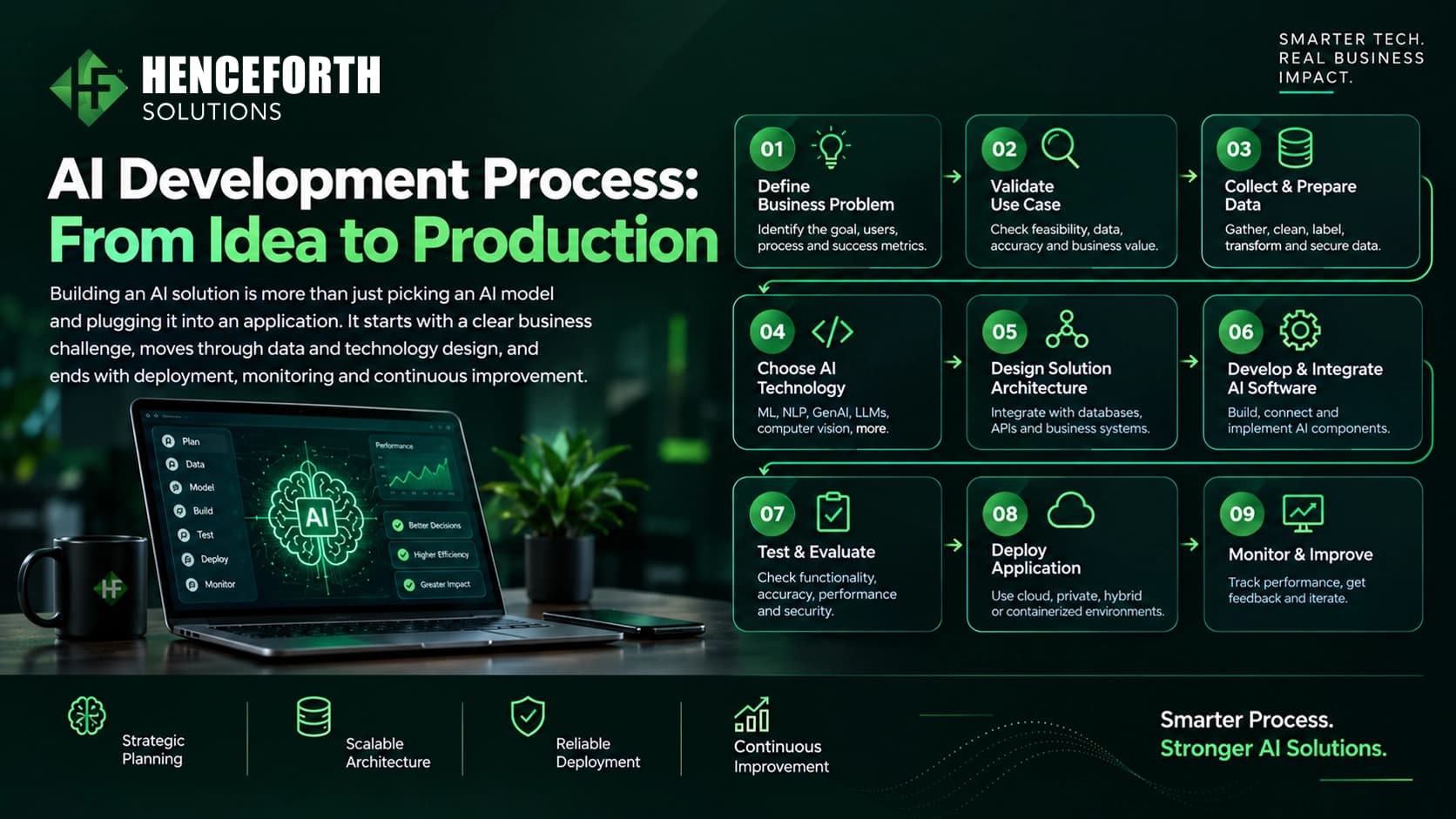
The AI App Development Process
1. Discovery and Product Strategy
The first step is understanding the business, users, current workflow, and desired outcome.
A discovery phase should answer:
Who will use the product?
What task or pain point will it address?
What existing tools must it connect with?
What data can the app safely use?
Which actions need human approval?
What should the first version include?
How will success be measured after launch?
A strong product strategy prevents teams from overbuilding before validating the idea.
2. Choose the Right Product Format

Your AI solution may be:
A customer-facing web application
An iOS or Android mobile app
A cross-platform Flutter or React Native app
A SaaS platform
An internal employee tool
A marketplace or on-demand platform
A connected IoT dashboard
An enterprise software module integrated into existing systems
For example, a field-service business may need a mobile app for technicians and a web dashboard for managers. A marketplace may need AI-supported search, seller tools, customer support, payments, and operations dashboards.
Mobile app development services and web development services should be planned around the real users and workflows—not only the device type.
3. Design the User Experience
AI does not remove the need for good UX.
Users need to understand what the app can do, what information it uses, when an answer may be uncertain, and how to reach a person when necessary.
A strong UI/UX design process helps teams map user journeys, reduce friction, build trust, and test important tasks before full development begins.
This is especially important for AI features. If an app gives suggestions, recommendations, or generated outputs, users should be able to review, correct, or reject them easily.
4. Prepare Data, Integrations, and Architecture
Most valuable AI apps need access to information already used by the business.
This may include:
CRM and ERP systems
Product catalogues
Customer-support platforms
Documents and knowledge bases
Inventory or order systems
Booking platforms
Payment tools
Internal databases
IoT devices or operational dashboards
AI integration services connect the AI product with approved business systems while defining what data the solution can access and what actions it is allowed to take.
This stage may also involve API development, microservices, cloud architecture, DevOps, data engineering, analytics, and security controls.
5. Build an MVP First
An MVP, or minimum viable product, is the smallest useful version of the app that can validate the business idea.
For example, instead of launching a full marketplace with every AI feature, an MVP could begin with:
A seller dashboard
Product listing and basic search
Customer enquiries
An AI assistant for common questions
A limited admin workflow
A small group of pilot users
The first version should solve one meaningful problem well. Once the team receives real user feedback, it can prioritise the next features with more confidence.
6. Test for Accuracy, Security, and Real-World Use
AI apps need standard software testing plus AI-specific testing.
Teams should test:
Functional flows and integrations
Mobile and browser compatibility
Performance under real usage
Data access and permissions
Incorrect or incomplete AI outputs
Prompt-injection and misuse scenarios
Human escalation paths
Accessibility and usability
Monitoring and error handling
The NIST AI Risk Management Framework is a useful reference for building trustworthy AI systems. For apps using large language models, teams should also review the OWASP Top 10 for LLM Applications for risks such as insecure output handling, sensitive-information disclosure, and prompt injection.
7. Launch, Measure, and Improve
An AI app should improve after launch.
Track the business outcomes linked to the original problem, such as:
Reduced support backlog
Faster response times
Fewer manual data-entry tasks
More qualified leads
Better customer completion rates
Higher employee adoption
Reduced operational errors
Improved retention or conversion
The first release is not the final product. It is the point where the team starts learning from real users.
What Affects AI App Development Cost?
There is no single cost for building an AI app because every product has different requirements.
The main cost factors include:
Product Complexity
A simple internal knowledge assistant will require less work than a multi-user SaaS platform with role-based dashboards, payments, integrations, mobile apps, reporting, and AI-powered workflows.
Type of AI Feature
A basic chatbot using approved content has different requirements from an AI agent that takes actions across several systems. Custom machine-learning models, computer vision, multilingual capability, and advanced personalisation can also increase complexity.
Data Quality and Availability
AI systems need reliable data. If information is scattered, outdated, unstructured, or inaccessible, the team may need to clean, organise, and integrate it before the AI feature becomes useful.
Integrations
Connecting with CRMs, ERPs, payment gateways, booking tools, inventory systems, APIs, or internal databases adds planning, development, testing, and security work.
Web, Mobile, or Both
A web-only product is different from a product that requires iOS, Android, cross-platform mobile development, and an administrative dashboard.
Security and Compliance Requirements
Fintech, insurance, healthcare, payments, and enterprise systems may require stricter access controls, audit trails, data protection, testing, and compliance review.
Post-Launch Support
Apps need maintenance, monitoring, feature improvements, cloud management, performance optimisation, and support as user needs change.
The best way to estimate cost is to define the MVP scope first. A focused first version is more useful than a large feature list based on assumptions.
AI App Development Across Industries
Fintech and Insurance
AI apps can support customer onboarding, document workflows, service requests, internal knowledge access, risk-related processes, and operational dashboards. Sensitive decisions should remain governed by qualified teams.
eCommerce and Marketplaces
AI can improve product discovery, search, customer support, seller assistance, recommendations, and reporting. Businesses building multi-vendor platforms can combine AI with marketplace development for user flows, payments, dashboards, and scalable operations.
Healthcare
Healthcare solutions can support scheduling, administrative workflows, patient communication, and internal operations. Privacy, security, clinical review, and relevant regulations must remain central to the product design.
Logistics and On-Demand Services
AI-enabled web and mobile products can support delivery workflows, customer updates, dispatching, route-related operations, document processing, driver communication, and reporting.
Real Estate
AI apps can improve enquiry handling, document organisation, property discovery, follow-up workflows, and customer communication while keeping professional decisions and advice human-led.
Education
AI can support learning journeys, internal workflows, content organisation, student communication, and reporting. The experience should remain clear, inclusive, and appropriate for users’ needs.
What Services Are Needed to Build an AI App?
A complete AI product may require more than one development service.
Depending on the idea, the project can include:
AI consulting and product strategy
Generative AI, AI agents, chatbots, automation, ML, and model integration
MVP and rapid prototype development
Web, mobile, SaaS, and enterprise software development
UX/UI and product design
APIs, microservices, cloud architecture, DevOps, and data engineering
Marketplace, on-demand, eCommerce, fintech, insurance, blockchain, and IoT development
Legacy system modernisation and performance optimisation
Dedicated development teams, white-label development, and CTO-as-a-Service support
The right approach is not to use every service. It is to combine only the capabilities needed to create a useful, secure, scalable product.
Build the Right AI App, Not Just an AI Feature
The strongest AI apps are built around a real business need, clear user journeys, reliable data, controlled integrations, and human accountability.
Start with the problem. Define the first useful version. Test it with real users. Then scale the parts that create measurable value.
Henceforth Solutions helps businesses plan, design, build, integrate, and improve AI-powered web, mobile, SaaS, marketplace, and enterprise products. If you are exploring a custom AI app, talk to our team about the right development roadmap.