
Enterprise mobile app development helps businesses build secure, scalable mobile applications for employees, customers, partners, and field teams. Unlike consumer apps, enterprise applications must work with existing business systems, protect sensitive data, support multiple user roles, and remain reliable as the organization grows.
From sales teams accessing CRM data on the go to logistics staff managing deliveries in real time, mobile apps can make business operations faster, more connected, and easier to measure.
If you are planning a business app, this guide explains the essential features, development process, cost factors, security requirements, and technology choices involved in enterprise mobile app development.
What Is Enterprise Mobile App Development?
Enterprise mobile app development is the process of creating mobile applications designed for business operations at scale. These apps are built for internal teams, customers, vendors, or partners and are usually connected to systems such as CRM, ERP, HRMS, inventory management, payment gateways, analytics tools, or cloud databases.
A business may use an enterprise app to:
Give employees secure access to business data
Automate field operations and reporting
Improve communication between departments
Manage sales, inventory, customer support, or deliveries
Enable approvals, task tracking, and document workflows
Provide customers with self-service access
A well-planned enterprise app should solve a specific operational problem rather than simply replicate a website on mobile.
Enterprise Apps vs Consumer Apps
Consumer apps are primarily designed for large audiences, simple onboarding, and quick engagement. Enterprise apps have more complex requirements because they must fit into real business workflows.
Area | Consumer App | Enterprise Mobile App |
|---|---|---|
Main users | General public | Employees, clients, vendors, partners |
Authentication | Basic sign-up or social login | Role-based access, SSO, MFA, permissions |
Data | Limited user data | Sensitive business and operational data |
Integrations | Often standalone | CRM, ERP, HRMS, APIs, cloud systems |
Offline use | Optional | Often essential for field teams |
Security | Standard app security | Compliance, audit logs, access controls |
Scale | User growth | Users, workflows, systems, locations, data volume |
Common Enterprise Mobile App Use Cases
Enterprise mobile apps can support almost every industry when they are built around a real workflow.
Sales and CRM Apps
Sales teams can view leads, update deal stages, prepare quotations, access product information, and record meeting notes without returning to a desktop system.
Field Service Apps
Technicians can receive job assignments, access checklists, upload photos, collect customer signatures, and close service requests from the field.
Logistics and Delivery Apps
Logistics businesses can use mobile apps for route management, proof of delivery, real-time tracking, driver communication, and delivery issue reporting.
Employee Self-Service Apps
Employees can request leave, access payroll information, submit expenses, complete training, receive announcements, and manage internal tasks.
Inventory and Warehouse Apps
Warehouse teams can scan products, update stock levels, manage picking and packing, and record movements across locations.
Customer Portals
Customers can view orders, manage subscriptions, raise support tickets, access documents, and receive personalized service updates.
For businesses that need a tailored product, custom mobile app development services can help turn these workflows into a secure iOS, Android, or cross-platform application.
Essential Features of an Enterprise Mobile App
The right features depend on the business model, but the following capabilities are commonly required.
1. Role-Based Access Control
Not every user should see the same data. Role-based access control allows administrators to define what employees, managers, customers, vendors, or field staff can view and change.
For example, a sales executive may update leads, while a sales manager can view team performance and approve discounts.
2. Secure Authentication
Enterprise apps should use secure login methods such as multi-factor authentication, single sign-on, biometric login, or organization-managed identity systems where required.
Authentication should be planned early because it affects user experience, security, and integration requirements.
3. API and Business System Integrations
Most enterprise apps are not standalone products. They need to exchange information with systems such as:
CRM platforms
ERP software
Accounting systems
Payment gateways
Inventory tools
HRMS platforms
Cloud databases
Analytics tools
A clear API and microservices strategy helps the app communicate reliably with these systems as it grows.
4. Offline Access and Data Synchronization
Field staff may work in warehouses, remote areas, construction sites, or locations with weak internet access. Offline functionality lets users continue working and syncs approved data when a connection returns.
This feature requires careful planning to prevent duplicate records, conflicting updates, or lost data.
5. Push Notifications and Alerts
Notifications help users respond to time-sensitive events, such as a new lead, task assignment, approval request, stock alert, delivery update, or system announcement.
The best notifications are useful and targeted. Too many alerts reduce adoption.
6. Audit Logs and Activity Tracking
Audit logs record important actions within the app, including changes to data, approvals, logins, and permission updates. These logs improve accountability and can support compliance requirements.
7. Reporting and Analytics
Enterprise users often need dashboards that show KPIs, performance trends, task completion, sales activity, operational delays, or customer requests.
Analytics should focus on decisions users need to make, not just data that looks impressive.
Enterprise Mobile App Development Process
A successful enterprise app is built through a structured product development process.
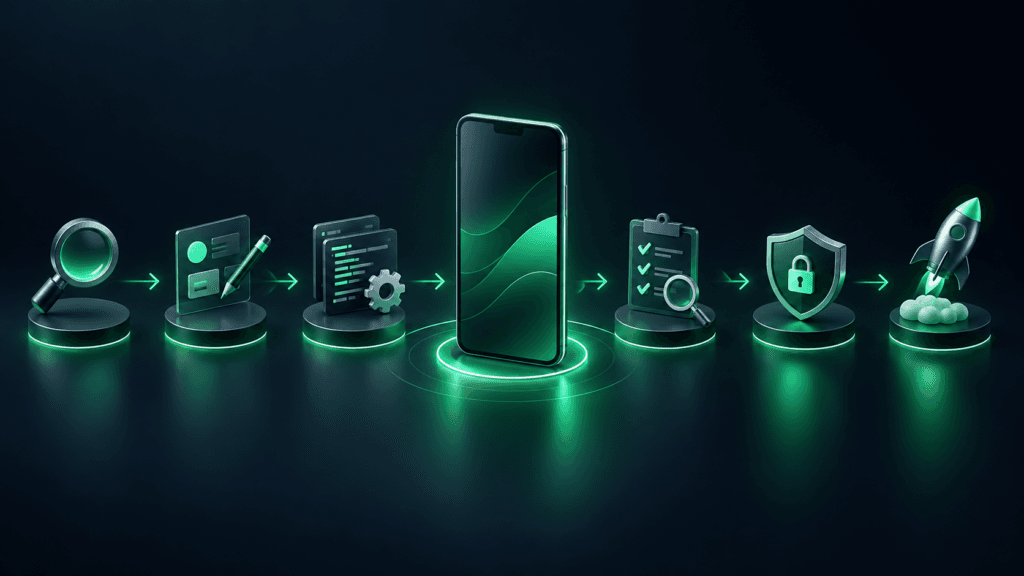
Phase 1: Discovery and Workflow Mapping
The first step is to understand the current workflow, users, systems, and operational challenges.
This stage should answer questions such as:
Who will use the app?
What problem does it solve?
Which existing systems must it connect to?
What data will users access or update?
Which tasks need approval or audit trails?
What does success look like after launch?
Documenting the workflow before development reduces rework later.
Phase 2: Product Strategy and Scope
After discovery, the team defines the first release. Instead of building every feature at once, focus on the highest-impact workflow for the MVP.
The scope should include:
User roles and permissions
Core features
Required integrations
Platforms: iOS, Android, or both
Security requirements
Reporting needs
Future roadmap
A practical MVP helps businesses test adoption before investing in broader automation.
Phase 3: UX/UI Design
Enterprise UX design should make complex workflows easy to complete. The design needs to account for different users, device sizes, field conditions, accessibility, and frequent tasks.
A strong UI/UX design process helps teams create clear user journeys before engineering begins.
Phase 4: App Development and Integration
Developers build the mobile application, backend services, APIs, integrations, and admin controls. This is where architecture decisions become important.
The team may choose native development, cross-platform development, or a hybrid approach based on performance needs, integrations, timeline, and long-term maintenance.
Phase 5: Quality Assurance and Security Testing
Testing should cover more than basic app screens. Enterprise testing includes:
Functional testing
Device and operating-system testing
Integration testing
Performance testing
Offline and synchronization testing
User permission testing
Security testing
Regression testing before each release
For mobile security awareness, review the OWASP Mobile Top 10, which outlines common mobile application security risks.
Phase 6: Launch, Training, and Continuous Improvement
Launch is not the end of development. Teams should monitor adoption, crashes, user feedback, workflow completion, and feature usage after release.
Training, onboarding, support, and a regular release plan help businesses achieve stronger long-term adoption.
How Much Does Enterprise Mobile App Development Cost?
The cost of enterprise mobile app development varies because every business has different workflows, integrations, data requirements, and security needs.
The main cost factors include:
Cost Factor | Why It Matters |
|---|---|
App complexity | More workflows, screens, and user roles require more development effort |
Platforms | Building for iOS, Android, or both changes scope |
Integrations | CRM, ERP, payment, inventory, and third-party APIs add complexity |
Security | SSO, MFA, encryption, audit logs, and permissions require additional planning |
Offline functionality | Local storage and conflict resolution increase development work |
UI/UX requirements | Complex user journeys and dashboards need more design effort |
Admin panel | Management, reporting, and role-control systems add scope |
Future scalability | Architecture should support growth without requiring a rebuild |
The best way to estimate cost is to define the workflow, users, integrations, and MVP requirements before requesting a proposal. Avoid choosing a development partner only on the lowest initial quote; poorly planned architecture can create higher costs after launch.
Native vs Cross-Platform Development for Enterprise Apps
Both native and cross-platform approaches can work for enterprise mobile apps.
Native App Development
Native apps are built separately for iOS and Android using platform-specific technologies. This approach can be a strong fit when the app needs deep device integrations, advanced performance, or platform-specific user experiences.
Cross-Platform App Development
Cross-platform frameworks such as Flutter can help businesses build for iOS and Android from a shared codebase. This can reduce development time and make maintenance easier when the product requirements are suitable.
The right choice depends on your business workflow, target users, integrations, performance requirements, and budget. A reliable app development company should recommend the approach based on product needs not a one-size-fits-all stack.
Security Requirements for Enterprise Mobile Apps
Security must be part of the development process from the beginning. Enterprise apps often handle customer records, employee data, financial information, operational documents, or business-critical workflows.
Key security practices include:
Encrypting sensitive data in transit and at rest
Applying strong authentication and session management
Using role-based permissions
Validating APIs and server-side requests
Maintaining audit logs
Protecting local device storage
Testing for common mobile vulnerabilities
Keeping dependencies and libraries updated
Reviewing access rights regularly
For technical guidance, Android developers can review Android app manifest and security documentation, while iOS teams can use Apple’s security documentation.
How to Measure Enterprise App Success
A mobile app should be measured by business outcomes, not downloads alone.
Track metrics such as:
Active users by role or department
Time saved per workflow
Task completion rate
Error reduction
Adoption rate after launch
Customer response time
Field-job completion time
Sales conversion or follow-up speed
Support ticket reduction
Data accuracy and reporting quality
These metrics help teams identify what to improve in future releases.
How to Choose an Enterprise Mobile App Development Company
Before selecting a development partner, ask practical questions:
Have they worked with complex workflows and integrations?
How do they handle security, testing, and deployment?
Who owns the source code and intellectual property?
How will they manage scope changes?
What is their process for post-launch support?
Can they explain the architecture in clear business terms?
How will the app scale as users and data increase?
Will they provide documentation and knowledge transfer?
The right partner should understand both the technology and the business process behind the app.
Build an Enterprise App Around Your Business Workflow
Enterprise mobile apps work best when they are designed around real users, daily operations, and measurable outcomes. Whether you need a field-service tool, customer portal, logistics app, inventory system, or employee application, the goal should be to make work simpler, faster, and more reliable.
Henceforth Solutions builds custom mobile applications for businesses that need scalable digital products, integrations, and user-focused experiences. Explore our mobile app development services to discuss your enterprise app requirements.